
 Worldwide
 France
 Germany
 United Kingdom
 Italy
Italy
 United States
 Spain
Spain
 Poland
 Romania
 Croatia
 Australia
 Austria
 Belgium
 Brazil
 Bulgaria
 Czech Republic
 Denmark
 Finland
 Greece
 Hungary
 India
India
 Japan
Japan
 Lithuania
 Netherlands
 New Zealand
 Norway
 Serbia
 Slovakia
 Slovenia
 South Africa
 Sweden
 United Arab Emirates

Chapters
- Portfolio – structured risk segmentation
- What is Portfolio Management?
- Why it matters (and when you’ll feel it)
- From a single dashboard view to structured portfolios
- New notification and navigation options
- Practical use cases: turning structure into action
- Best practices to get value fast
- Portfolio management as a decision framework
- What is Portfolio Management?
- Why it matters (and when you’ll feel it)
- From a single dashboard view to structured portfolios
- Portfolio – structured risk segmentation
- New notification and navigation options
- Practical use cases: turning structure into action
- Best practices to get value fast
- Portfolio management as a decision framework
Portfolio – structured risk segmentation
A Portfolio allows you to group monitored companies based on criteria that reflect how your business operates. You decide how to structure it — whether by industry, geography, risk tier, or any combination of filters that match your internal workflows. This flexibility means each portfolio is tailored to your needs, giving you and your team a focused, relevant view of the companies that matter most to you.
Each user can have one or multiple portfolios (selectable via dropdown), and portfolios can be assigned to specific users.
Charts and insights apply only to the monitored companies inside that portfolio — giving you a focused, segment-level view rather than a global one.
Only administrators can create portfolios, ensuring consistency and control in how risk segmentation is structured internally.
"It answers our real monitoring needs — how risk is spread across tenants, guarantors, and parent companies, and which ones should be a priority. It's much more visual and qualitative. The big advantage is that everything is integrated: no more going to Excel and filtering manually."
Pilot Customer about the new Portfolio Management feature,
What is Portfolio Management?
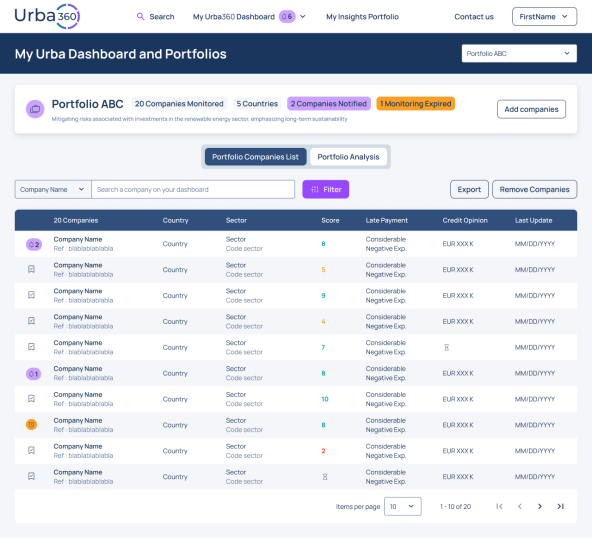
Portfolio Management is a feature in Urba360 that lets you create curated sets of business partners based on the criteria that matter to you — country, sector, relationship type, internal owner, financial health, and more — so you can track and review them as a coherent group.
Instead of searching and filtering from scratch each time, you create a portfolio once and return to it whenever needed, using it as your operational view for follow-ups, periodic reviews, and risk or performance monitoring. Thanks to ongoing monitoring, your portfolio displays the latest insights and updates on the companies you track.
Why it matters (and when you’ll feel it)
Portfolio Management becomes useful the moment you have:
• Many suppliers or partners across regions
• Different teams managing different subsets of partners
• Regular review routines (quarterly vendor reviews, renewals, audits)
• A need to proactively watch lower-performing or higher-risk partners
A portfolio gives you focus: “Here are the partners I care about for this purpose, right now.”
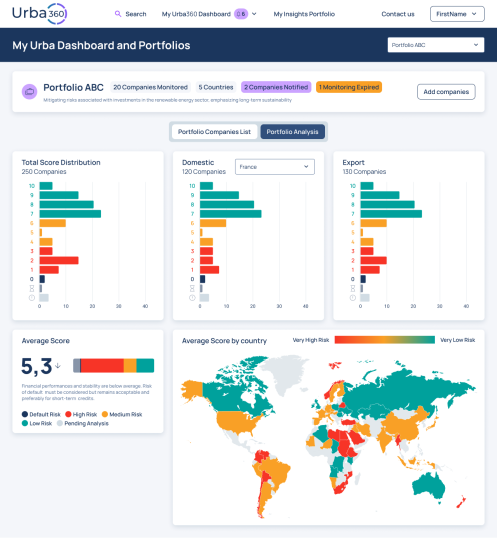
You can also explore your monitored companies through interactive charts and a risk distribution map.
Looking ahead to 2025 and 2026, the fastest growth is expected in machinery, electrical equipment, and food. Demand should also rise for components tied to renewable energy and digital infrastructure such as grid equipment, storage, and data center hardware.
From a single dashboard view to structured portfolios
Urba360 now offers two complementary levels of visibility:
Dashboard – your business partner overview
The Dashboard shows all companies — both monitored and unmonitored — in a single view.
Interactive insights and analytics apply to monitored companies only, and include:
- Combined and advanced filters (including monitoring expiration date)
- A dedicated filtering panel and search bar
- Risk distribution charts
- Average score indicators
- Country-level visualisations
- Improved readability across trends, scores, and dates
- An upgraded Excel export (including monitoring expiration date).
New notification and navigation options
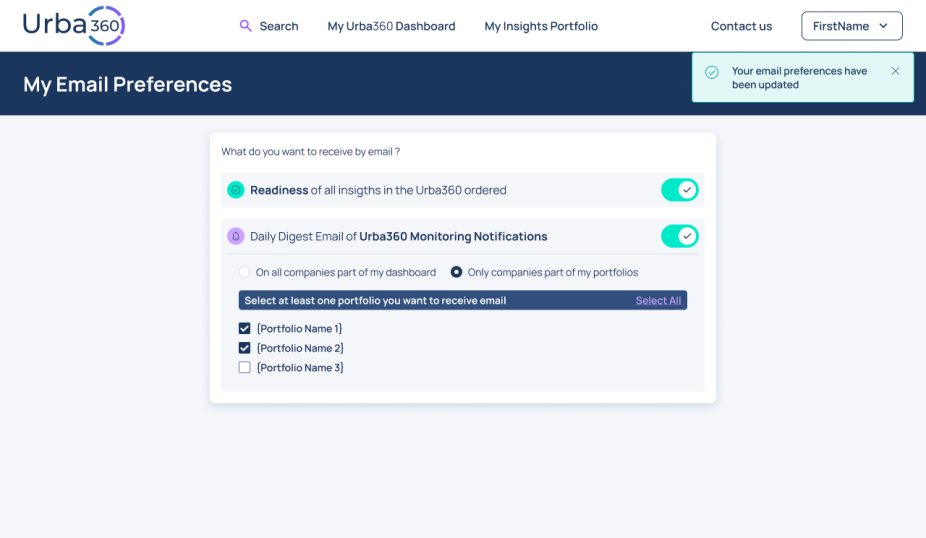
For users with Portfolio Management, additional configurations are now available to give you greater control over what you receive and when:
- Portfolio-level notifications — tailor alerts to the specific portfolio you want to monitor
- Email preferences — customize how and when you receive updates through the new preference menu
- Quick portfolio navigation — if you've created portfolios, switch between them directly from the top header
Portfolio Management demo
Practical use cases: turning structure into action
Here’s how Portfolio Management can be used in real-life scenarios.
1. Create a portfolio for suppliers in a specific country (e.g. Germany)
This portfolio is perfect for regional compliance checks, country-specific risk monitoring, or local procurement reviews.
How to set it up:
- Create portfolio: “Suppliers – Germany”
- Filter:
Country: Germany
- Criteria:
Business partner type: Supplier
Country: Germany
From this country-based list, you can easily select and group the relevant companies into your portfolio based on your operational criteria — such as business relationships, active partners, ownership by a specific team, or specific categories you manage — creating a focused and actionable monitoring list in just a few clicks.
If macroeconomic pressure, sector stress, or score downgrades affect several suppliers simultaneously, you can:
- Reassess payment terms
- Diversify suppliers
- Escalate internally before disruption occurs
- Instead of reacting to a supply interruption, you anticipate it.
2. Create a sector-based portfolio (e.g., Agri-Food)
This is ideal for category management, sector-specific risk tracking, or commercial strategy.
How to set it up:
- Create portfolio: “Business Partners – Agri-food”
- Criteria:
- Sector/Industry: Agri-food NACE codes
- Optional: include only certain relationship types (e.g., suppliers + processors), restrict to a region, or include only strategic partners
With this portfolio allows you to:
- Monitor all companies in that sector in one place.
- Analyze risk distribution across the segment.
- Use dynamic KPIs to filter companies by score or trend.
- Export the full list with expiration dates for structured review.
If the sector shows increasing pressure (cost volatility, regulatory changes, demand slowdown), you can:
- Adjust credit limits.
- Strengthen contractual safeguards.
- Reduce overexposure.
- Identify alternative partners in stronger segments.
- Portfolio-level visibility helps transform sector monitoring into measurable action.
3. Create a high-risk watchlist (Score 4 and below)
This is the “pay attention now” portfolio — built to reduce surprises.
How to set it up:
- Create portfolio: “Watchlist – Score ≤4
- Criteria:
Score: ≤4
Optional: limit to suppliers only, active only, or high-spend only (so the list stays actionable)
How you use it:
- Review the portfolio regularly
- For each partner:
Confirm the underlying reason for the low score (performance, compliance, financial risk, responsiveness, etc.)
Decide the next step: reassess exposure, renegotiate terms, request corrective actions, adjust volumes, or qualify alternatives
Document decisions and owners so follow-up actually happens
Example: If you see three critical suppliers dip to ≤4, you can immediately schedule a commercial review and start scouting alternatives before it becomes a disruption.
Best practices to get value fast
- Keep portfolios purpose-driven: “Who is this for, and what action will we take from it?”
- Establish a cadence: watchlists weekly; regional/category portfolios monthly or quarterly
- Use consistent naming: Scope−Type−Rule (e.g. "Germany-Suppliers-Active")
- Make ownership clear for shared portfolios: one person accountable keeps the portfolio trustworthy
Portfolio management as a decision framework
Portfolio Management is not just about grouping companies.
It introduces:
- Structured segmentation
- Clear permission management
- Focused notifications
- Visual risk analysis
- Simplified reporting
Most importantly, it allows you to align risk monitoring with how your business is actually organised — by country, sector, risk level, or strategic importance.
Instead of reviewing companies randomly, you review them with purpose.
That shift — from isolated checks to structured oversight — is where better risk decisions begin.
“The new portfolio management feature smoothens the user experience. Being able to build portfolios means I can organize all the entities better, and it’s much easier to use.”
Pilot Customer about the new Portfolio Management feature,
Try for yourself
What is Portfolio Management?
Portfolio Management is a feature in Urba360 that lets you create curated sets of business partners based on the criteria that matter to you, country, sector, relationship type, internal owner, financial health, and more, so you can track and review them as a coherent group.
Instead of searching and filtering from scratch each time, you create a portfolio once and return to it whenever needed, using it as your operational view for follow-ups, periodic reviews, and risk or performance monitoring. Thanks to ongoing monitoring, your portfolio displays the latest insights and updates on the companies you track.
Why it matters (and when you’ll feel it)
Portfolio Management becomes useful the moment you have:
• Many suppliers or partners across regions
• Different teams managing different subsets of partners
• Regular review routines (quarterly vendor reviews, renewals, audits)
• A need to proactively watch lower-performing or higher-risk partners
A portfolio gives you focus: “Here are the partners I care about for this purpose, right now.”
You can also explore your monitored companies through interactive charts and a risk distribution map.
Looking ahead to 2025 and 2026, the fastest growth is expected in machinery, electrical equipment, and food. Demand should also rise for components tied to renewable energy and digital infrastructure such as grid equipment, storage, and data centre hardware.
From a single dashboard view to structured portfolios
Urba360 now offers two complementary levels of visibility:
Dashboard – your business partner overview
The Dashboard shows all companies, both monitored and unmonitored, in a single view.
Interactive insights and analytics apply to monitored companies only, and include:
- Combined and advanced filters (including monitoring expiry date)
- A dedicated filtering panel and search bar
- Risk distribution charts
- Average score indicators
- Country-level visualisations
- Improved readability across trends, scores, and dates
- An upgraded Excel export (including monitoring expiration date).
Portfolio – structured risk segmentation
A Portfolio allows you to group monitored companies based on criteria that reflect how your business operates. You decide how to structure it, whether by industry, geography, risk tier, or any combination of filters that match your internal workflows. This flexibility means each portfolio is tailored to your needs, giving you and your team a focused, relevant view of the companies that matter most to you.
Each user can have one or multiple portfolios (selectable via dropdown), and portfolios can be assigned to specific users.
Charts and insights apply only to the monitored companies inside that portfolio, giving you a focused, segment-level view rather than a global one.
Only administrators can create portfolios, ensuring consistency and control in how risk segmentation is structured internally.
"It answers our real monitoring needs — how risk is spread across tenants, guarantors, and parent companies, and which ones should be a priority. It's much more visual and qualitative. The big advantage is that everything is integrated: no more going to Excel and filtering manually."
Pilot Customer about the new Portfolio Management feature,
New notification and navigation options
For users with Portfolio Management, additional configurations are now available to give you greater control over what you receive and when:
- Portfolio-level notifications — tailor alerts to the specific portfolio you want to monitor
- Email preferences — customise how and when you receive updates through the new preference menu
- Quick portfolio navigation — if you've created portfolios, switch between them directly from the top header
Portfolio Management demo
Practical use cases: turning structure into action
Here’s how Portfolio Management can be used in real-life scenarios.
1. Create a portfolio for suppliers in a specific country (e.g. Germany)
This portfolio is perfect for regional compliance checks, country-specific risk monitoring, or local procurement reviews.
How to set it up:
- Create portfolio: “Suppliers – Germany”
- Filter:
Country: Germany
- Criteria:
Business partner type: Supplier
Country: Germany
From this country-based list, you can easily select and group the relevant companies into your portfolio based on your operational criteria — such as business relationships, active partners, ownership by a specific team, or specific categories you manage — creating a focused and actionable monitoring list in just a few clicks.
If macroeconomic pressure, sector stress, or score downgrades affect several suppliers simultaneously, you can:
- Reassess payment terms
- Diversify suppliers
- Escalate internally before disruption occurs
- Instead of reacting to a supply interruption, you anticipate it.
2. Create a sector-based portfolio (e.g., Agri-Food)
This is ideal for category management, sector-specific risk tracking, or commercial strategy.
How to set it up:
- Create portfolio: “Business Partners – Agri-food”
- Criteria:
- Sector/Industry: Agri-food NACE codes
- Optional: include only certain relationship types (e.g., suppliers + processors), restrict to a region, or include only strategic partners
This portfolio allows you to:
- Monitor all companies in that sector in one place.
- Analyse risk distribution across the segment.
- Use dynamic KPIs to filter companies by score or trend.
- Export the full list with expiry dates for structured review.
If the sector shows increasing pressure (cost volatility, regulatory changes, demand slowdown), you can:
- Adjust credit limits.
- Strengthen contractual safeguards.
- Reduce overexposure.
- Identify alternative partners in stronger segments.
- Portfolio-level visibility helps transform sector monitoring into measurable action.
3. Create a high-risk watchlist (Score 4 and below)
This is the “pay attention now” portfolio — built to reduce surprises.
How to set it up:
- Create portfolio: “Watchlist – Score ≤4
- Criteria:
Score: ≤4
Optional: limit to suppliers only, active only, or high-spend only (so the list stays actionable)
How you use it:
- Review the portfolio regularly
- For each partner:
Confirm the underlying reason for the low score (performance, compliance, financial risk, responsiveness, etc.)
Decide the next step: reassess exposure, renegotiate terms, request corrective actions, adjust volumes, or qualify alternatives
Document decisions and owners so follow-up actually happens
Example: If you see three critical suppliers dip to ≤4, you can immediately schedule a commercial review and start scouting alternatives before it becomes a disruption.
Best practices to get value fast
- Keep portfolios purpose-driven: “Who is this for, and what action will we take from it?”
- Establish a cadence: watchlists weekly; regional/category portfolios monthly or quarterly
- Use consistent naming: Scope−Type−Rule (e.g. "Germany-Suppliers-Active")
- Make ownership clear for shared portfolios: one person accountable keeps the portfolio trustworthy
Portfolio management as a decision framework
Portfolio Management is not just about grouping companies.
It introduces:
- Structured segmentation
- Clear permission management
- Focused notifications
- Visual risk analysis
- Simplified reporting
Most importantly, it allows you to align risk monitoring with how your business is actually organised by country, sector, risk level, or strategic importance.
Instead of reviewing companies randomly, you review them with purpose.
The shift from isolated checks to structured oversight is where better risk decisions begin.
“The new portfolio management feature smoothens the user experience. Being able to build portfolios means I can organize all the entities better, and it’s much easier to use.”
Pilot Customer about the new Portfolio Management feature,